
This feature is only available with the following products:

Q: How can I communicate the Foursome GGID to my players so that they can log into the mobile app?
A: The following methods can be used to communicate foursome GGIDs to your players:
1st Option: Email
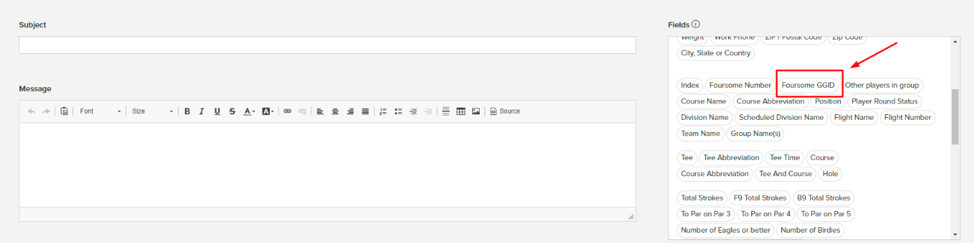
You can email the Foursome GGID to your players by going to Rounds > Manage Emails > Compose Email. While you are composing the message to your players, you can include the "Foursome GGID" data field (as shown below).
2nd Option: Text Message
You can text message the Foursome GGID to your players by going to Rounds > Manage Text Messages > New Text Message. While you are composing the message to your players, you can include the "Foursome GGID" data field (as shown below).

3rd Option: Scorecard
Many scorecards already include the dynamic field for the Foursome GGID. However, if your scorecard does not include it, you can add it in using the "Add Text or Field" option in the Header & Foot tab (as shown below). When adding the Foursome GGID, you only need to include the P1 Foursome GGID, as all golfers share the same Foursome GGID.

4th Option: Pro Tip Sheet
You can email the Pro Tip Sheet out to your players if you do not mind everyone seeing the Foursome GGID for each group. You can run this report from the Report Center (as shown below) and attach it to an email to your players.
5th Option: Player Tip Sheet
If you would rather not have everyone see all of the Foursome GGIDs, then you can use the Player Tip Sheet instead of the Pro Tip Sheet (as shown below).
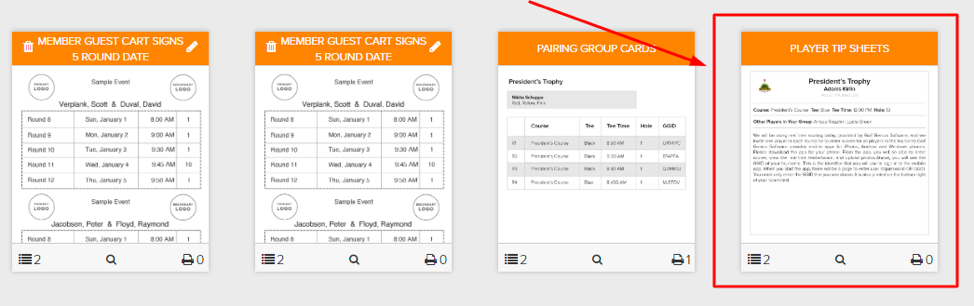
When you click on Configure and Print for this report, you will see the option to Email All Tip Sheets (as shown below). This will email each player a personalized tip sheet.

6th Option: Reports
You can add the foursome GGID to any report using the Report Composer. However, several community reports already include the foursome GGID, which might meet your needs. Just search for GGID (as shown below).
