
This feature is available for the following products:

The purpose of producing a User Scored Tournament is to allow you to manually award points and purse for a contest that we cannot score for you when using the scores you input (e.g., closest to the pin, longest drive, longest putt, best dressed, etc.).
In this article, we will discuss how to manage a user scored tournament.
Adding a User Scored Tournament
To Add a User Scored Tournament, follw these directions:
Within your event/league, navigate to Rounds > Tournaments.
Click "Add User Scored Tournament."
When adding a User Scored Tournament, you will be asked to name the tournament and select how it will be scored. Points and purse can be awarded to members, pairs, three/foursomes, or by team. If you would like to award the user scored tournament points/purse to teams, make sure to select the proper team list (Note: If using Teams, the Team List must be in the "All Gofers" Division). This can be seen in the GIF below:

Entering Results, Purse, and Points
To enter results for a User-Scored Tournament, go to Rounds > Tournaments > Enter Results or Proximities as shown below:
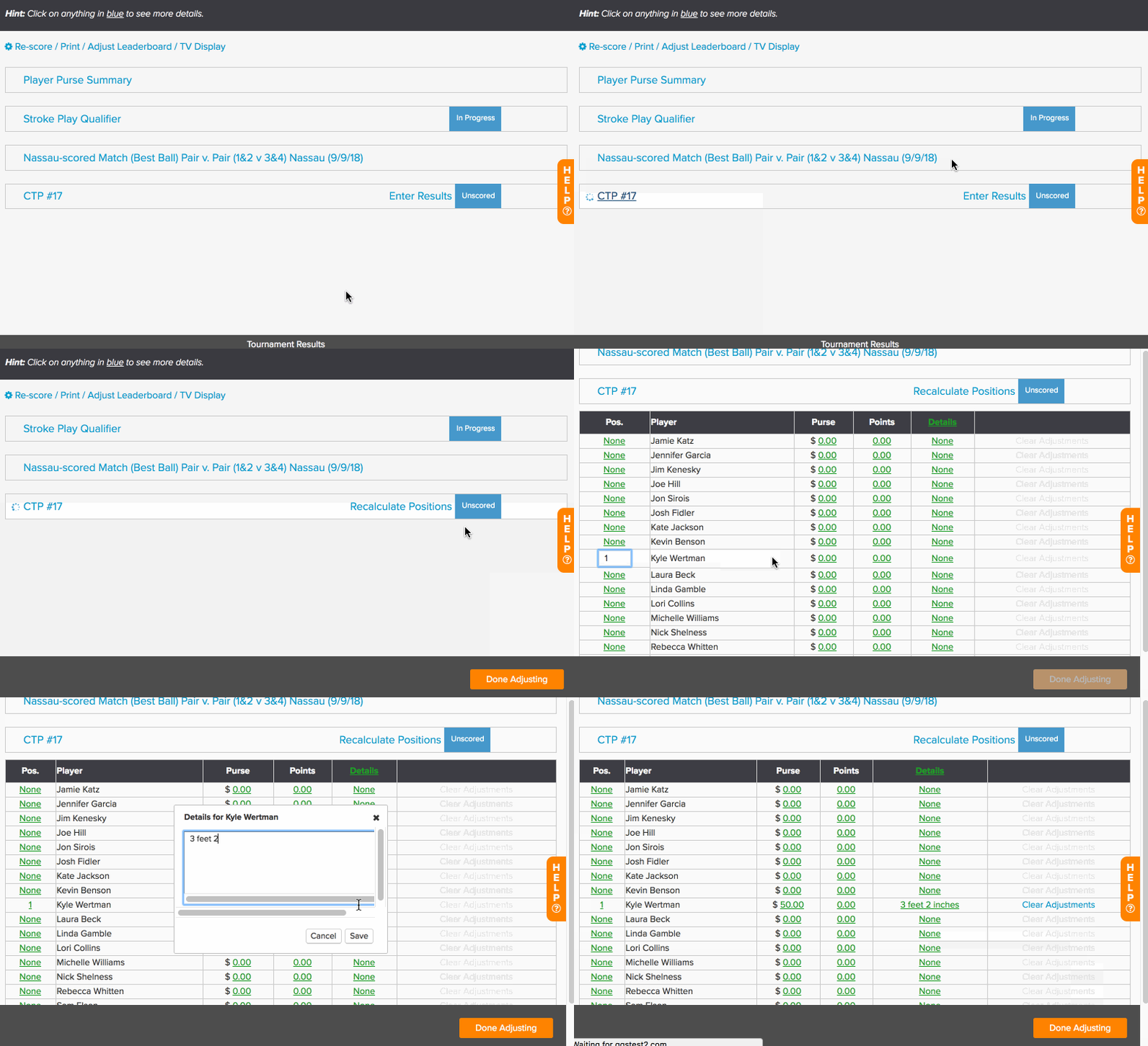
You will then have the ability to manually input the points/purse for the user scored tournament. In the example above, we enter Kyle Wertman as the winner for the Closest to the Pin on #17. He won $50.
Clearing Results / Making Adustments
If you made a mistake or other changes occurred to the adjustments, you will see the option on the right to clear any adjustments you made. You will also see a button to recalculate positions. If you make some changes to the points and purse, this option will properly re-order the players correctly by the amount of points or purse that has been won.
When you are finished awarding points/purse, click "Done."
Tournament Library Behavior for User-Scored Tournaments
All User-Scored Tournaments are automatically saved to the event or league’s Tournament Library once they are created.
After creating a User-Scored Tournament, you can manage it by navigating to Rounds > Tournaments > Tournament Library. From the Tournament Library, you will have the option to play the tournament in the active round as well as the option to auto-include it in all future rounds.
Money List Standing
You can include User Scored Tournaments purse in the Money List Standing, however, they do not count toward the number of wins.
Edit the existing tournament or create a new one by clicking "Add User Scored Tournament."
Check the Include in Money List option (as shown below).

Click Save.
To aware purse to the Money List from the leaderboard, follow these instructions:
Navigate to your event/league.
Mark the round as completed.
Award purse on the Leaderboard.
Go to Rounds > Display Leaderboard.
Click the Award Purse to Money List button.
A job will be triggered to calculate each player's earnings. Once complete, the updated Money List standings will be displayed below the Tournament Results and Player Purse Summary on the Leaderboard.