
"You have our team as a 12, but we're a 13!!". How do you respond to that 5 minutes before tee time?
We built the Handicap Analysis to answer these sorts of questions. This tool can be found under the Rounds Menu, and it is a great resource to look at and see how Playing Handicaps are computed.
In this article, we will discuss reading the Handicap Analysis, and how it reads when "Use new handicapping methods" is set to "Yes."
Reading the Handicap Analysis
When using the Handicap Analysis, you can select what tournament Playing Handicaps to look at specifically. For instance, you may have an individual stroke play tournament played at 100% of the Playing Handicap, and a Skins game played at 50%. Unmistakably, the Playing Handicaps will be different for both tournaments.
When clicking on a tournament, you will see an overview of the Playing Handicap settings (as shown below).

These settings can be changed in the Event/League Profile (except Handicap Allowance, which can be changed in the tournament setup).
To see how a specific player's Playing Handicap was computed, click on the player (as shown below).

Above is an example of a Playing Handicap computation. This tournament is played at 90% of the Course Handicap. You will see the step-by-step details for computing the Playing Handicap.
You can also override a computed Playing Handicap by clicking "Adjust Playing Handicap".
Let's take a look at a more complex computation of a team Playing Handicap.
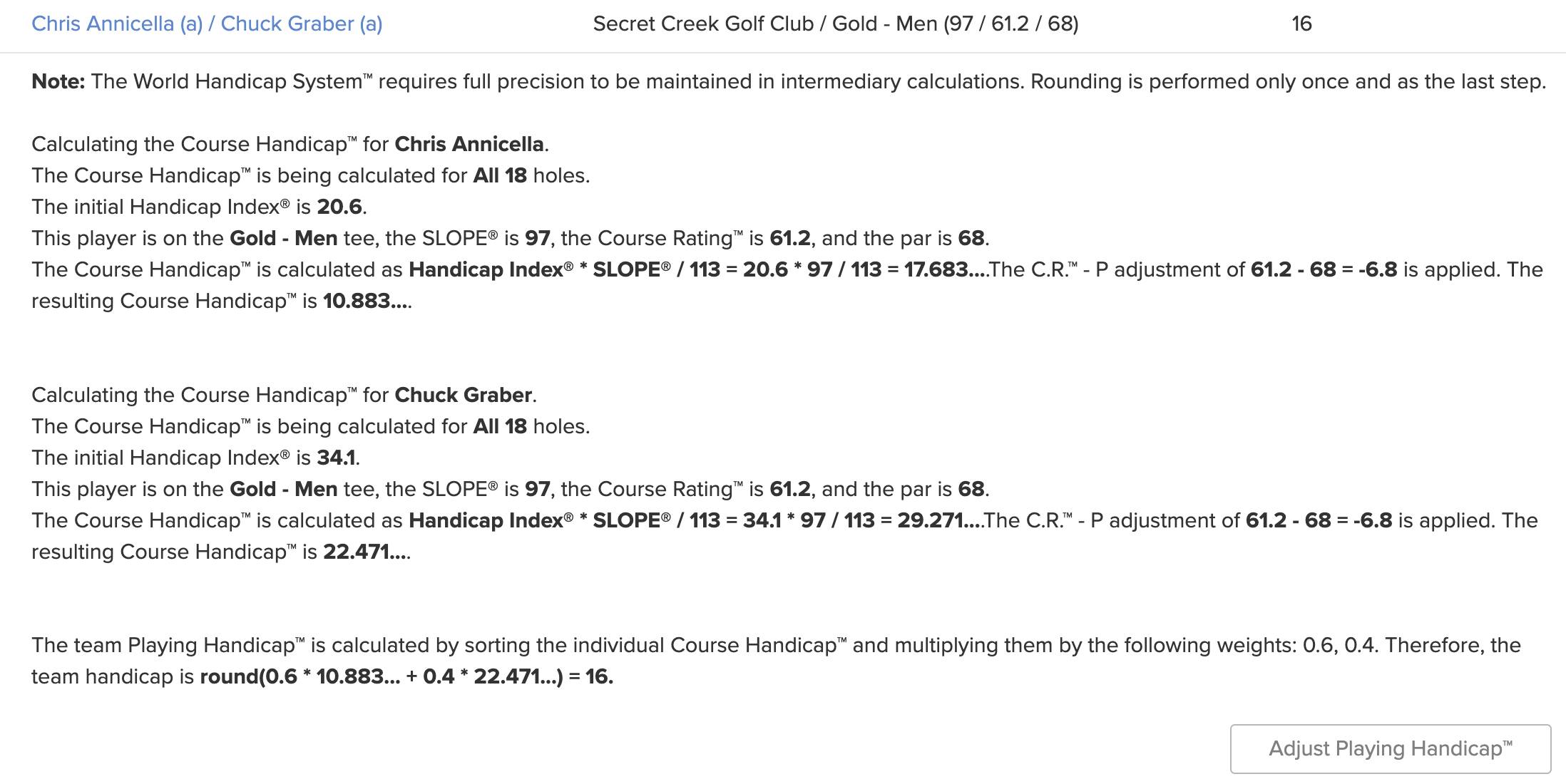
The team above is playing an alternate shot match using Chapman/Scotch handicapping (60% of A player and 40% of B Player). They are playing the match off the lowest ball in the match. In the end, you will see this team will receive 16 strokes in the match.
As you can see, computing Playing Handicaps can sometimes be overwhelming. The Handicap Analysis tool will help you better understand how Playing Handicaps are computed, even in the most complex cases.
If you would also like to make this tool available to your players, you can also add the Handicap Analysis Portal Page to any of your portals. Click Here for details.
Handicap Order of Operations Alignment (2024 USGA Rules of Handicapping)
Note: This option is available by request. Please reach out to your account manager or the support team for assistance.
Each event/league can calculate Playing Handicaps using a step order that aligns with the 2024 USGA Rules of Handicapping and WHS guidelines. When "Use new handicapping methods" is set to "Yes," the Handicap Analysis shows the steps in that order and explains each one.
This option must be enabled by your Golf Genius Account Manager. If you would like more information about this option, Click Here.