
If you are managing a round with players who do not have established Playing Handicaps, you may want to consider using Peoria Handicapping. This handicapping system uses scores from the round being played and computes a Course Handicap for every player.
The benefit of Peoria Handicapping is that your players will not know what holes will be used to compute their Playing Handicaps. So your players will not be able to "blow up" on a hole in order to "blow up" their Playing Handicap.
In this article, we will discuss how to set up a tournament using Peoria Handicapping.
How Peoria Playing Handicaps are Computed
Below are the steps on how Playing Handicaps are computed using the Peoria system:
Take the difference between the player's scores and par values of all the holes selected to be used in the Peoria scoring (In other words, how many strokes over par the player was on the selected holes). The maximum score counted on each hole for this step is set by the Handicap Calculation Cap option — Double Par by default, or Triple Bogey/Double Bogey/No Cap. See Step 4 below in "Setting Up Peoria Handicapping."
Divide 18 by the number of holes you selected to be used for Peoria Scoring.
Multiply the number computed in Step 1 with the number computed in Step 2. Then round that number. The rounded number will be the player's Playing Handicap.
Make the Handicap Allowance adjustment (if necessary).
Example:
Danny is playing in a round using the Standard Peoria system (6 holes to be used for handicapping, Double Par cap). On those six holes, Danny was a total of 9 over par. Multiply 9 by 3 (18 holes/6 holes used for scoring = 3). Danny's full Playing Handicap is 27.
The Standard Peoria system uses 80% of the full Playing Handicap so Danny's adjusted Playing Handicap would be 22. If Danny's 18 hole gross score was 85, then his net score would be 63.
If your account has Plus Handicaps enabled and a player's calculation comes out better than scratch, that player receives a plus handicap (e.g., +2) instead of being floored at zero. See "Handicap Limitation — Enable Plus Handicap" below.
Setting Up Peoria Handicapping
To set up a tournament using Peoria Handicapping, follow these instructions:
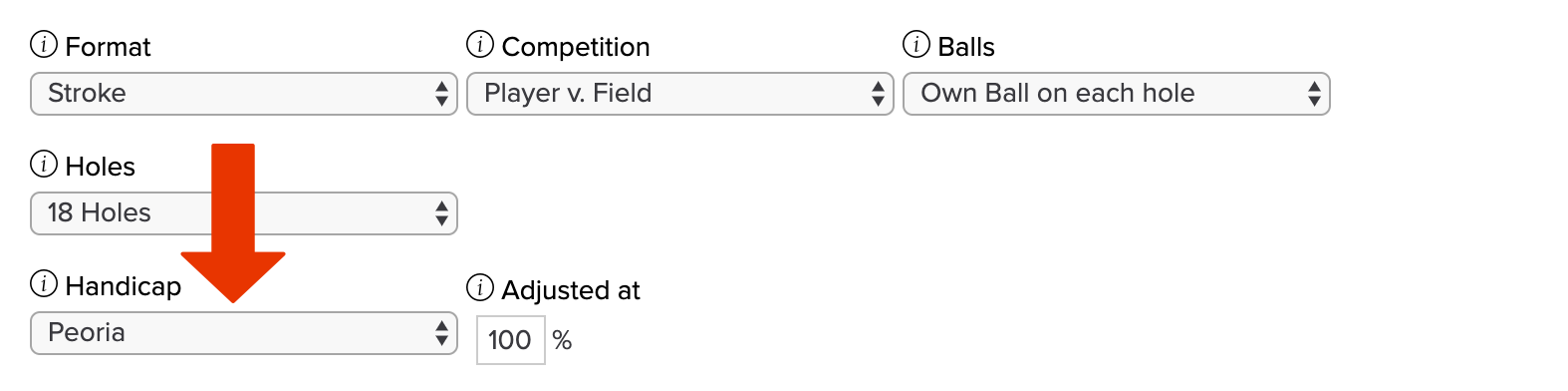
Go to the tournament setup and select "Peoria" in the "Handicap" dropdown (as shown below).

Note 1: It is not suggested to use Peoria for a Match Play tournament, as it will impact the results after the match is completed. If you do use Peoria Handicapping for Match Play, ensure all matches play all 18 holes. Further, inform players that the tournament results are not final until the round has been set to completed and the Peoria Handicap has been processed.
Note 2: It is not recommended to use Peoria for scramble tournaments because there will be very few scores over par.Enter the following:
Show par from: Use the "Show par from" course and tee selectors to choose which course and tee's par values are displayed under each hole number in the next step.
Select what holes to be used to compute Playing Handicaps (as shown below). Every hole in the picker shows its par under the number, pulled from the course/tee you selected in the previous step. You should not let your players know which holes you are selecting prior to the round.

If using the Standard Peoria method, select 6 holes (If you are playing a nine hole round, select 3). It's a general recommendation that you select two Par 3s, two Par 4s, and two Par 5s. It is also recommended that you select one of each type per nine. For instance, select a Par 3 on the front and a Par 3 on the back. If you are using the USGA Modified Peoria system, you will want to select four Par 4s, one Par 3, and one Par 5. Sometimes the Double Peoria System is used. This system simply uses 12 holes instead of 6 holes to compute a Playing Handicap.As you select holes, a live "N selected · par X" summary updates so you can confirm you've reached the total you intended. You must select at least one hole to save; if none are selected, you'll see "Please select at least one Peoria hole."
Click "See advanced Peoria settings" below the hole picker to expand two additional cap options. Note: Collapsing the section again only hides these controls, their values are still saved.

Per-Hole Gross Cap: Sets the maximum strokes counted on each hole for scoring and the leaderboard. This is the maximum score a player can take on a hole and what will be displayed on the leaderboard for that hole.
Handicap Calculation Cap: Sets the maximum strokes counted on each hole for the Peoria handicap formula only. The two caps are independent, so, for example, you can show uncapped gross scores on the leaderboard (No Cap) while still computing the handicap from double-par-capped scores (Double Par).
Both options offer the same four choices. For example, a 10 on a par 4, here's what each caps the score to:
Double Par (default): 2 × par — an 8.
Triple Bogey: Par + 3 — a 7.
Double Bogey: Par + 2 — a 6.
No Cap: The full strokes taken — a 10.
By default, leaving both options untouched keeps Double Par for each.
Peoria tournament has two additional Advanced Handicap Options that were not previously available. To easily access these options when setting up your Peoria tournament, select "Click here to set the handicap options." This will open the Advanced Handicap Options, with two additional options available:
Minimum Playing Handicap: Alongside the existing gender maximums above, you can set a Minimum Playing Handicap™ (labeled Minimum Course Handicap™ for non-WHS customers) per gender, for both 18-hole and 9-hole play.
Enabled by its own checkbox; set per gender, with separate values for 18-hole and 9-hole play — the same layout as the maximums.
Values are entered in plus notation — "+4" is a plus bound.
A plus minimum (e.g., allowing handicaps down to +3) only takes effect when Plus Handicaps are enabled if "Enable plus handicaps" is checked, as outlined below; otherwise, the floor never goes below "0" or scratch.
Enable plus handicaps: Within that same expanded section, click "Click here to set the handicap options" to open the Advanced Handicap Options dialog without leaving the picker. This is where you'll find the option to enable Plus Handicaps. Note: More details about this option can be found below.

After you select the holes and configure any advanced options, select the proper Handicap Allowance percentage (if needed).
Click "Save" to create the tournament.
Handicap Limitation — Enable Plus Handicap
When checked, players whose calculated handicap comes out lower than the scratch baseline receive a plus handicap instead of being floored at 0.
A strong round can now produce +1, +2, and so on, carried into the player's net result.
Plus handicaps display with a leading plus sign ("+2") wherever handicaps are shown.
Off by default — the floor at scratch stands exactly as before, even if a plus Minimum Playing Handicap has been entered in Advanced Handicap Options.
Example: A player whose handicap calculation comes out two strokes lower than scratch is recorded at scratch (0) without this option enabled. With the option enabled, the same player is recorded at +2.