
This feature is available for the following products:

Note: If you would like this feature enabled, please contact support.
Most tournaments typically have one round, but often, they may be multiple rounds. When you have these multiple-round tournaments, you might find yourself looking to see what the leaderboard looked like in a previous round.
The round-by-round snapshot provides the capability to see previous round standings. It is only available when setting up a Multi-Round Tournament. In this article, we will discuss enabling and using round-by-round snapshots.
Enabling Round Snapshot:
If your multi-round tournament is already set up, go to Event/League > Multi-Round Tournaments > Edit > Display. Here, you will have several options for the tournament display. Check the box, "Show past-round selector to see round by round leaderboards", (as shown below).
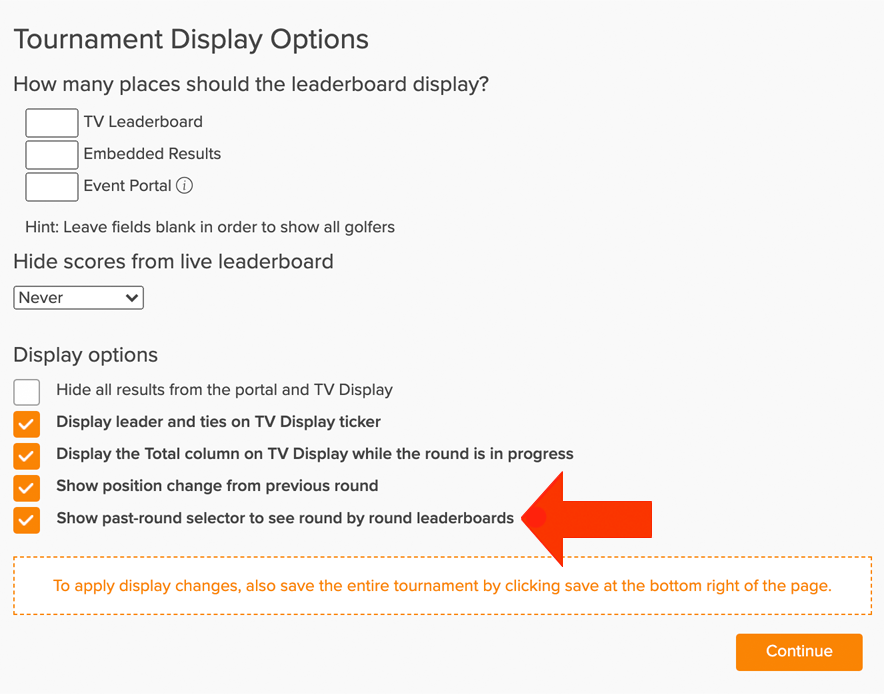
After you have checked the box, click "Continue" and "Save".
If you have not created your multi-round tournament, Click Here for details on getting that set up.
Displaying Previous Round Standing:
The round-by-round snapshot will be enabled in the following locations:
Managers Leaderboard
In the customer center, within an Event/League, to look at previous round standing with the snapshot, go to Round > Leaderboard, select the multi-round tournament, and you will see the option to pick the round you would like to look at the snapshot, (as shown below).

For more ways to customize the leaderboard, Click Here.