
You can register to Diligentsia in either of three ways, through the home page, through an existing user/advisor/investor inviting you and the 2 minute Test. See below.
User registration from the home page
User registration from the home page is the process from the diligentsia.co.uk website home page where a visitor to the site sets up an account on the platform for the first time. They may be an owner who comes to the site to set up a company and then invite additional users to register onto the platform to access that Company (or Group). The process of registration and setting up your company is free
There are two other methods of registration:
Q How to I register from the Diligentsia home page?

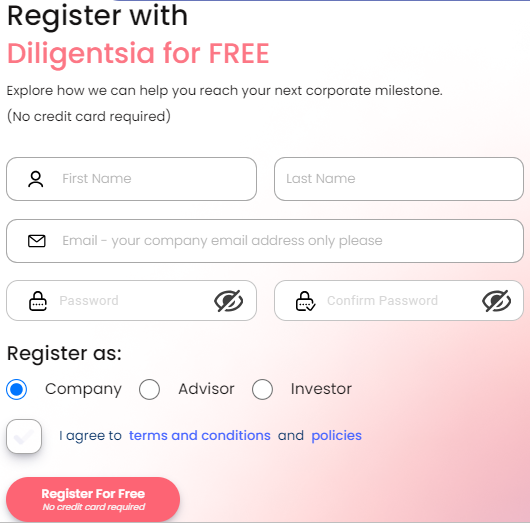
Step 2. Complete the registration form. It is important that you use your company email address.
Step 2. Complete the registration form. It is important that you use your company email address.
Step 3: After clicking on register, a popup would prompt you to enter a code. The code has been sent to your email and a welcome email as well. By default, two-factor authentication (2FA) is enabled via email. For information on setting up alternative 2FA methods, please click here to access the settings in your user profile.
Step 3: After clicking on register, a popup would prompt you to enter a code. The code has been sent to your email and a welcome email as well. By default, two-factor authentication (2FA) is enabled via email. For information on setting up alternative 2FA methods, please click here to access the settings in your user profile.
Step 4: You'll be taken to your company index. For more information on adding a company, please click here.
Step 4: You'll be taken to your company index. For more information on adding a company, please click here.

Please click on the indent above to expand into more instructions.
FAQs
Q: Does it cost anything to register?
No, registration is free.
Q: What is the difference between registration and login?
You register the first time you come to the Diligentsia platform. Thereafter you login as an existing user.
Q: What information is needed to register?
You will need to provide your name, email address, company details, and a password.
Q: What happens after I register?
After registration, a verification email will be sent to you. Click the link in the email to verify your account.
Q: Can I register multiple users for my company?
Yes, after creating your company, you can invite additional users to register and join your company on the platform.
Q: Do I need a company email to register?
Yes, it is recommended to use your company email when registering on the platform.
Q: Can I register using a personal email?
While possible, using a company email is recommended to align with the platform's business focus.
Q: What permissions will I have as the initial registrant?
The initial registrant is the company owner and will have full access permissions to the platform.
Q: Is two-factor authentication (2FA) required during registration?
Yes, email-based two-factor authentication is set as the default for new users, ensuring security.
Q: Can I use other authentication methods?
Yes, after registration, you can set up alternative two-factor authentication methods(Authenticator app and SMS) from your profile settings.
Q: What should I do if I don’t receive the verification email?
The verification email should arrive almost immediately. If not, check your spam or junk folder, and if it’s not there, request a new email from the registration page.
Q: Can I complete the 2-minute test during registration?
Yes, the 2-minute test can be completed before or after registration, helping you assess your company’s readiness.
Q: How long does the registration process take?
The registration process typically takes a few minutes, including verification.
Troubleshooting FAQs: Registration from Home Page
Q: Why can’t I find the registration form on the home page?
A: Ensure you are on the correct website, diligentsia.co.uk. Look for the “Register” or “Sign Up” button prominently displayed on the home page.
Q: What should I do if the registration page isn’t loading?
A: Check your internet connection and try refreshing the page. If the issue persists, try clearing your browser cache or using a different browser.
Q: Why does the registration form say my email is already in use?
A: This means an account with your email already exists. Use the “Forgot Password” option to reset your password and regain access.
Q: Why am I not receiving the 2FA code email?
A: Check your spam or junk folder. Ensure that your email provider is not blocking messages from Diligentsia.
Q: What should I do if the 2FA code doesn’t work?
A: Double-check the code for accuracy. If it still doesn’t work, request a new code from the login page.
Q: Can I register without providing a company name?
A: Yes, you can register without providing a company name.
Q: Why is my password not being accepted?
A: Ensure your password meets the platform’s requirements (e.g., minimum length, special characters). Avoid using common passwords.
Q: What should I do if I forget my password during registration?
A: Complete the registration process, then use the “Forgot Password” option on the login page to reset your password.
Q: Can I skip the 2-minute test and still register?
A: Yes, the 2-minute test is optional and can be completed at any time.
Q: Why am I unable to add a company after registration?
A: Ensure you are logged in with the correct permissions as a company owner. If issues persist, contact support for assistance. you can also check out our article on adding a company here for more info
Q: Can I register multiple companies with one email?
A: No, each company requires a separate registration. However, you can be invited as a user to multiple companies.
Q: Why can’t I invite users to join my company?
A: Only company owners or users with specific permissions can invite others. Check your role permissions in your profile settings.
Q: What happens if I register with a personal email by mistake?
A: While personal emails are allowed, company emails are preferred as they ensure better alignment with professional communication and organizational policies.
Q: Can I change my company name after registration?
A: No, you can't change your company name but there are some company details that can be updated from your company settings. Check an article on company settings here Contact support if you face issues.
Q: Why is the system not accepting my company email?
A: Ensure the email address is formatted correctly (e.g., no spaces or typos). Contact your email administrator if the issue persists.
Q: What should I do if the system logs me out during registration?
A: The system is designed to ensure that users remain logged in throughout the registration process. Registration is a quick and seamless procedure that should be completed in minimal time.
Q: Can I register on a mobile device?
A: No, the platform does not support mobile devices.
Q: How can I contact support if I encounter issues during registration?
A: Visit the 24/7 support chatbot at the bottom right or email support@diligentsia.co.uk for assistance.
Registration from Email Invite
Q I have received an invite. What do I do?
The process for getting up and running on the Diligentsia platform having received an invite from the platform owner is as follows:
Step 1 - You have received an invite email. Check your inbox and click on verify email.
Step 1 - You have received an invite email. Check your inbox and click on verify email.

Step 2 -After clicking on "Verify Email", you are invited to set your new password:
Step 2 -After clicking on "Verify Email", you are invited to set your new password:

Step 3 - you can now login using your company email address and new password just created. Email 2FA is setup automatically, a popup will prompt you to enter a code for verification, an email containing the code has been sent to your email.
Step 3 - you can now login using your company email address and new password just created. Email 2FA is setup automatically, a popup will prompt you to enter a code for verification, an email containing the code has been sent to your email.

Popup

Step 4 - You are taken to the Company Index of the company that invited you. You can also set up your user profile at the left sidebar.
Step 4 - You are taken to the Company Index of the company that invited you. You can also set up your user profile at the left sidebar.

User Profile.


To go to your user profile, you can find it on your sidebar on your left hand. For more information on how to set up your user profile, please click here.
Step 5 - you can now use all the features that your owner has authorized you to use on the platform.
Step 5 - you can now use all the features that your owner has authorized you to use on the platform.
Please click on the indent above to expand into more instructions.
FAQs
Q: What details are needed to complete registration?
You need to verify your email, set a password, and fill out your user profile details.
Q: What should I do if I don’t receive the invite email?
Check your spam folder or ask the company owner to resend the invite.
Q: How do I set my password after receiving the invite?
Follow the link in the invite email to create a new password.
Q: What permissions do I have after registration?
Your permissions depend on what the company owner has authorized you to access.
Q: What should I do if I forget my password after registration?
Click the "Forgot Password" link on the login page to reset it.
Q: Can I invite others after accepting my email invite?
No, only company owners or admins can invite additional users.
Q: Can I edit my profile after registering?
Yes, you can update your profile by navigating to the user profile section in the sidebar.
Q: Can I be invited to multiple companies?
Yes, you can be invited to multiple companies, but each requires a separate registration.
Q: How do I know what features I can use after registration?
Your available features are determined by the permissions granted by the company owner.
Q: Can I switch between companies if I’m invited to more than one?
Yes, you can switch between companies using your dashboard if you’re registered with multiple organizations.
Q: What should I do if the invite link expires?
Request a new invite from the company owner or administrator.
Q: Can I use the platform immediately after registration?
Yes, once registration is complete, you can use the platform.
Troubleshooting
Q: Why haven’t I received the invite email?
A: Check your spam or junk folder. If the email is still missing, ask the company owner or admin to resend the invite.
Q: What should I do if the invite link isn’t working?
A: Ensure you’re using the latest link sent to your email. If the link has expired, request a new invite from the company owner.
Q: Can I register without verifying my email?
A: No, email verification is required to complete your registration and gain access to the platform.
Q: How do I reset my password if I lose access during registration?
A: Use the “Forgot Password” option on the login page to reset your password. You can click here for more info on that.
Q: Can I change my email address after registration?
A: No, the email used during registration is fixed. If changes are needed, contact support for assistance.
Q: What should I do if I accidentally delete the invite email?
A: Request the company owner or admin to resend the invitation.
Q: Can I use a personal email to register on the platform?
A: No, you must use the company email address specified in the invite.
Q: What happens if I don’t set up my user profile immediately after registration?
A: You can still use the platform with limited functionality, but completing your profile ensures optimal use of the features. Check out our User Profile article here
Q: Can I update my permissions after registration?
A: No, permissions are set by the company owner. Contact them to request changes to your access levels.
Q: How do I know what permissions I have after registration?
A: Modules and places you don't have access to would be greyed out, this is based on the access granted by the company owner.
Q: Can I register on behalf of someone else using their invite?
A: No, invites are specific to each user and tied to their email address.
Q: What should I do if the registration process freezes?
A: Refresh your browser, clear your cache, and try again. If the problem persists, contact support.
Q: Can I be invited to the same company more than once?
A: No, duplicate invitations are not allowed. Ensure the original invite is used for registration.
Q: How do I switch between companies after being invited to multiple organizations?
A: Yes, you can use the Company Index to switch between multiple companies.
Q: Can I share my invite link with others?
A: No, invite links are unique and should not be shared. Others must be invited directly by the company owner.
Q: Why am I seeing limited functionality after registration?
A: Your access depends on the permissions granted by the company owner or based on your subscription plan. Contact them if you require additional access or to upgrade.
Q: Can I decline an invite after receiving it?
A: Yes, you can choose not to register. If you change your mind, request a new invite from the company owner.
User Registration From 2-Minute Test
Q What is user registration from the home page?
User registration from the home page is the process from the diligentsia.co.uk website home page where a visitor to the site has no need to register (provide an email account) until they have experienced the platform through the 2-minute test and only register, at their option, at the end of the test if they wish to keep their test results. Registration is FREE.
There are two other methods of registration:
Q How to I register from the Diligentsia 2-minute test?
Step 1. After completing the two minute test, You can register to Diligentsia for FREE if you wish to keep your test results. There are two ways to do so. Which are: After clicking on "View 2 Minute Test Report", a register now popup would show, click on "Register for free" and complete the registration process. or you can click on "Registration" from your newly created company dashboard.
Step 1. After completing the two minute test, You can register to Diligentsia for FREE if you wish to keep your test results. There are two ways to do so. Which are: After clicking on "View 2 Minute Test Report", a register now popup would show, click on "Register for free" and complete the registration process. or you can click on "Registration" from your newly created company dashboard.


Step 2. Complete the registration form. It is important that you use your company's email address. After clicking on register, a pop-up will prompt you to enter a code. You will receive a welcome email as well as an email containing the code required. By default, two-factor authentication (2FA) is enabled via email. For information on setting up alternative 2FA methods, please click here to access the settings in your user profile.
Step 2. Complete the registration form. It is important that you use your company's email address. After clicking on register, a pop-up will prompt you to enter a code. You will receive a welcome email as well as an email containing the code required. By default, two-factor authentication (2FA) is enabled via email. For information on setting up alternative 2FA methods, please click here to access the settings in your user profile.

Email containing code

Welcome email

Step 3. You will then be taken to your Company Index, from which you can continue your FREE account, or can upgrade to Diligentsia Lite or Pro.
Step 3. You will then be taken to your Company Index, from which you can continue your FREE account, or can upgrade to Diligentsia Lite or Pro.

Step 4. From your company index you can continue to click through to your FREE dashboard and reports.
Step 4. From your company index you can continue to click through to your FREE dashboard and reports.
Please click on the indent above to expand into more instructions.
FAQs - Registration from 2-minute test
Q Does it cost anything to register?
No. Registration is free.
Q What is the difference between registration and login?
You register the first time you come to the Diligentsia platform. Thereafter you login as an existing user.
Troubleshooting
Q: What should I do if the registration pop-up doesn’t appear after the 2-Minute Test?
A: It might take few seconds. Kindly wait or Refresh the page and complete the test again. If the issue persists, contact support for assistance.
Q: Why didn’t I receive the welcome email after registering?
A: Check your spam or junk folder. If the email isn’t there, verify your email address or contact support.
Q: What should I do if the code for registration isn’t sent to my email?
A: Ensure you entered the correct company email address. Check your spam folder or request the code again. If the issue continues, contact support.
Q: Can I skip registration and still access my 2-Minute Test results?
A: No, registration is required to save and access your test results on the platform.
Q: Can I register with a personal email address instead of a company email?
A: While it is possible, registration requires a valid company email address to ensure proper account setup and functionality.
Q: What should I do if I entered the wrong email during registration?
A: Restart the registration process with the correct email. If you’ve already submitted the form, contact support for assistance.
Q: Why am I unable to complete the registration form?
A: Ensure all required fields are filled out correctly and that your internet connection is stable. If the issue persists, try a different browser.
Q: Can I use the platform without enabling Two-Factor Authentication (2FA)?
A: The Email method is activated by default during registration but you can decide whether to activate other methods or not.
Q: How do I set up an alternative 2FA method after registration?
A: Navigate to your user profile and update your 2FA settings to enable methods like SMS or an authenticator app. Check out our article on 2FA here
Q: Why does my registration code expire before I can use it?
A: Registration codes have a time limit for security purposes. Request a new code if your original code expires.
Q: Can I update my email address after registration?
A: No, the email address used during registration is fixed. Contact support if changes are necessary.
Q: What should I do if the system doesn’t recognize my email during registration?
A: Verify that your email matches the company domain. If the issue persists, contact support.
Q: Why am I seeing limited functionality after completing registration?
A: Free accounts have restricted features. Upgrade to Diligentsia Lite or Pro for full functionality.
Q: Can I register again if I’ve already completed the process?
A: No, registration is only required once. Use the login page to access your account as an existing user.
Q: What happens if I lose access to my registered email account?
A: Contact support immediately to update your email and regain access to your account.
Q: Can I delete my account after registering?
A: Yes, you can delete your account from the Company Settings menu. Note that this action is irreversible.