
At the System Armed screen, tap Disarm.

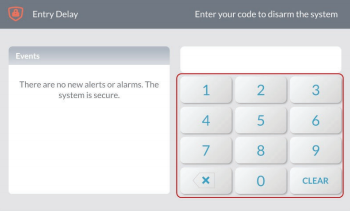
Enter your 4-digit user code.
The system is disarmed. The system announces "System Disarmed, Ready to Arm." If any protected doors or windows are open, the system announces "System Disarmed, Not Ready to Arm."
Learn how to easily and quickly disarm your 2GIG GC3 security panel.
At the System Armed screen, tap Disarm.
Enter your 4-digit user code.
The system is disarmed. The system announces "System Disarmed, Ready to Arm." If any protected doors or windows are open, the system announces "System Disarmed, Not Ready to Arm."